
ChessKid: The Complete Guide
“Mom, I’m bored!” This is a repeating refrain in most households. With parents busier than ever, it can be hard to choose an activity that’s engaging, healthy, and fits into the schedule. Too often, downtime becomes screen time by default. But…what if screen time could be good for them? Enter ChessKid.com, the best chess platform for kids!
What is ChessKid?
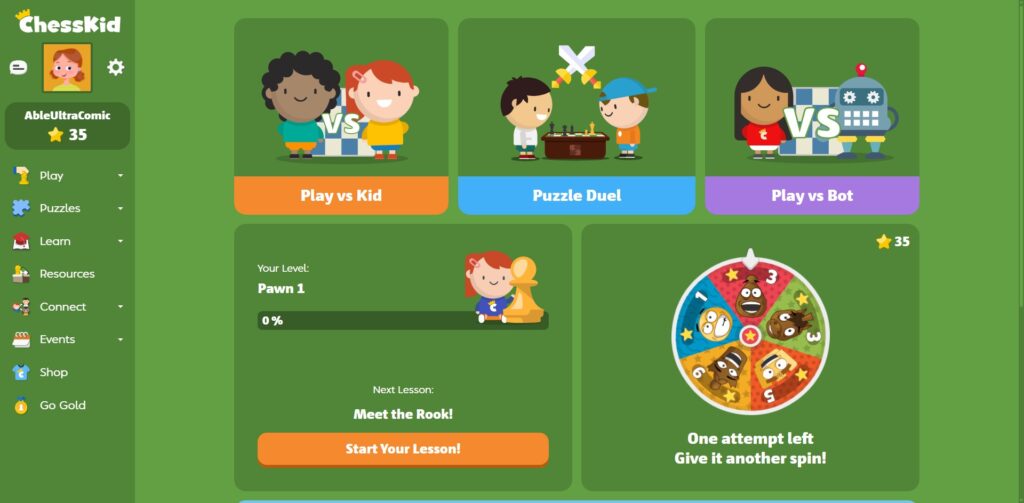
ChessKid is a complete platform for kids to learn and play chess. They can follow guided chess tutorials, solve puzzles to sharpen their skills, and play chess games online against other kids or bots. ChessKid is available on iOS, Android, and on a website. Kids can play as a guest, but signing up for a free account allows them to track their progress and access more of the features. A Gold Membership option grants unlimited access to tutorials and puzzles for a small monthly or annual fee.
Main Features of ChessKid
Learn
ChessKid has a robust chess training element. Beginners should start with the Lessons section, a set of guided chess tutorials that progress from the most basic rules of play to positions and strategy. As kids progress, they’ll unlock more lessons.
For a more varied chess training session, the Workouts and Vision activities are drills that focus on specific skills. Workouts provide repetitive practice of key positions encountered in chess matches. Recognizing these positions quickly helps players manage their time control and counter with effective moves. The Vision activity is a quickfire game reinforcing chess notation and awareness of the field of play. This is great for kids learning notation!

The *NEW* Austrian Coffeehouse Series Chess Pieces - 4.0" King

Premium Chess Box - Golden Heart

The Large Ultimate Chess Bag
Puzzles are always popular with kids, and great for a small bite of chess on a busy day. ChessKid has a huge puzzle library. Just click into the Puzzles tile for a random puzzle, or use the drop-down menu on the Puzzles page to select a theme. With over 50,000 puzzles and exercises, there are sure to be some real stumpers.
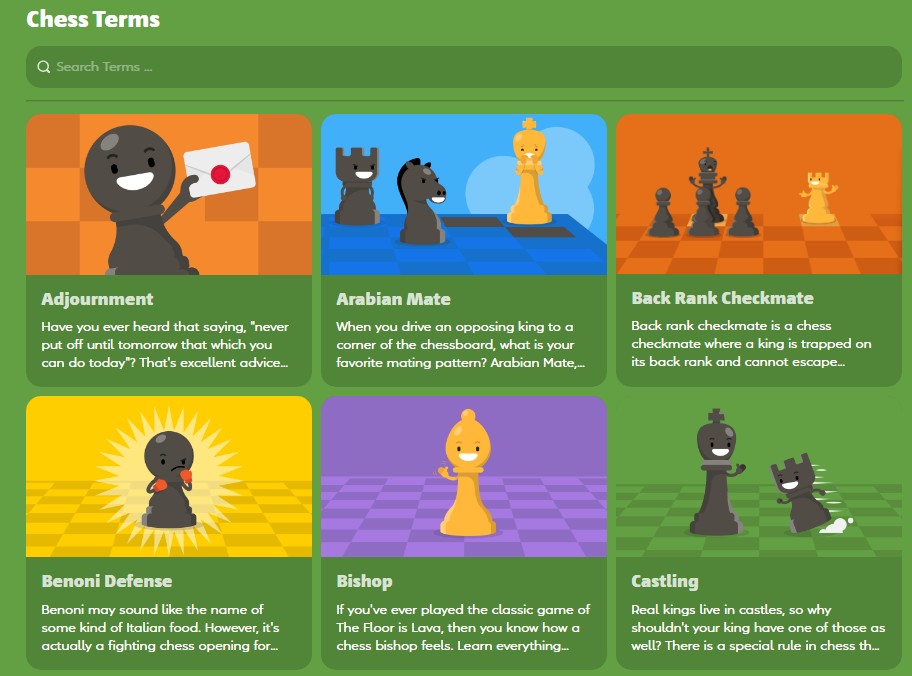
The illustrated glossary of Chess Terms is a gem. Clicking a tile displays a detailed explanation of the term. Think of it as your chess encyclopedia! The explanations are clear and include diagrams and animations. You might just find your chess kid reading through them for fun.
Once your chess kid has a few games under their belt, they can use Analyze Games to learn what was great and maybe not-so-great about their moves. With this tool, the Learn section truly has the full-circle feedback loop your kid needs to improve at chess.
Play
Play on the ChessKid site is flexible enough to match any kid’s interest level and ability. Kids can choose to play with other kids in live games, against a bot opponent, or a slow game (think kid correspondence chess).

The Library Imperial Collector Series Luxury Chess Pieces - 3.0" King

Luxe Premium Chess Box - Amboyna Burl

The House of Staunton DELUXE Tournament Bag
Playing against another kid online is simple. Clicking Play vs. Kid on the Play menu will bring up the New Game menu. Select the desired time control (5, 10, or 15 minutes), and ChessKid will match you with another player of a similar skill level. If your kid wants to play against a Friend, they can check whether anyone on their Friends list or from their club is online. Playing against a bot opponent is also super simple, just select that option and the bot avatar/personality. Bot games don't use time controls to give your kid extra time to think through those moves.

For a more relaxed online game with a real human, the Slow Chess option gives kids the ability to start a game and come back to it as their schedule allows. This is a wonderful way to play with friends or relatives who aren’t available at convenient times. Slow Chess also offers a menu of fun chess variants for kids who are ready to try new ways of playing chess.
One fun aspect of online play at ChessKid in the Puzzle Duel, where kids can solve puzzles in a race with another kid. This is great practice in pattern recognition, and racing against another player can give a competitive kid an extra incentive.
Teach
One of the most valuable resources for adults on the ChessKid site is the section focused on teaching chess. All of the resources are freely available, including a downloadable complete curriculum for teaching chess to kids. You can use the lessons as a parent or coach to teach chess, even if you’re not a skilled player yourself.
Chess clubs can register on ChessKid as well. Club members can connect to the club and other members easily this way! Clubs can access a wealth of features that make running a club easier and more engaging. Post messages, start in-club competitions, and post discussion topics on forums to keep players interacting outside of club time. ChessKid has a comprehensive article to help you register, add members and admins, and get the most out of your club account at How to Start and Manage a Club.
For larger programs, ChessKid has Coach Liaisons available to help you with their Big Program resources. If you’re looking for help with managing the digital clubhouse for your program, this is the best place to start. Email [email protected] with your questions.

The Fischer Spassky Series Chess Pieces - 6.0" King

The King Performance Chess Computer
Other Features
Stars and Gems
Stars and gems are in-game currency kids can earn by completing chess activities. Kids can use them to customize their avatar or unlock challenges. They can only be earned (no in-app purchases!) and used for virtual items. It’s a little incentive to complete the daily challenges and rack up points by playing and practicing. While avatar customization is currently only available on iOS, it will roll out to other platforms soon.
Ratings

ChessKid assigns a rating to every kid that will fluctuate based on their wins/losses/achievements. While this isn’t an “official” rating, it’s an effective incentive to keep training and playing games. The ratings are separated into Fast Chess and Slow Chess, which start at 800, and Puzzle, which starts at zero and goes up as your kid solves puzzles.
Benefits of ChessKid
Unlike many screen-time activities, playing chess develops some good habits we all need. Chess can help build focus and short-term memory skills. Winning and losing chess matches provide opportunities to practice good sportsmanship and emotional regulation. Committing to practicing a skill and improving can boost self-esteem. There’s even evidence that playing chess protects your brain as you age!

The Library Collection - The Anderssen Dropjaw Series Luxury Chess Pieces - 3'' King

Millennium eONE Electronic Chess Board for playing on chess.com
Chess is a lifetime hobby, as well, one that people enjoy at every age. ChessKid may be the beginning of a life-long love affair with the game—and who knows where it may take them? This inexpensive and fun sport can be the gateway to new friends and new experiences, whether they decide to compete seriously or play just for fun.
Safety features

One of the concerns parents have about any online platform is always safety. ChessKid has that handled. When you sign your kid up for their account, sign yourself up for a parent account and connect them via your email address.
- NO chat of any kind. Chat is consistently a pitfall of games intended for children. Open chat is rife with bullying and toxic comments. Kids unwittingly give out personal information to complete strangers. Adults posing as children use it for nefarious purposes. Scripted chat is not as bad, but it can still be used negatively. The most positive environment for games for young kids is no chat at all.
- Screen names are randomly assigned. No accidentally giving away personal information about name, location, or age with screen names like “AiyshaDenverGirl2015.” Note: Gold Membership has been recently changed to allow custom screen names, so be sure to check what your chess player selects to avoid embarrassing or revealing names.

- Online activity reports for parents. If you’re ever curious about what your kid is doing on ChessKid, access the Report Card feature. Along with all the stats for games and chess tutorials completed, you can review who they’ve connected with on the Friends list.
Getting started
To get your chess kid started on ChessKid, sign them up for a free account at ChessKid.com using the orange Sign Up badge on the top right. Make sure you also sign up for a parent account to access the Report Card and learning aids. You can also play chess with your kid from your parent account!
Whether you already have an obsessed chess kid or you’re trying to start a fledgling player, ChessKid is the perfect environment for them to blossom. ChessKid is the place to find a chess game, learn how to play, and improve their game, all in one safe and engaging online space. You’ll feel better about a little screen time in no time!
Frequently Asked Questions:
To get started with ChessKid, your young player should be able to navigate a simple app and use the touchscreen or a mouse/trackpad to enter moves. While some kids are ready to start learning chess as early as three, the prime time to start kids is between ages five and seven. ChessKid is best for kids 5-13 years old.
As far as free, kid-safe sites go, ChessKid is definitely the gold standard. While full access requires a Gold Membership, it’s inexpensive and not required for most of the site. Chess apps for adults often include features you may not want, such as live chat and location markers. For a more “gamified” chess learning experience, check out the ChessKid Adventure app. If your chess kid is feeling too advanced for ChessKid, Lichess has some controls that will allow you to turn off chat and location. Learn Chess with Dr. Wolf is a great app for learning chess, but it lacks online play capability.
Playing games online can seem risky, given all we’ve heard about online bullying and adults misusing platforms like Roblox and Fortnite. You’re right to be cautious! Online chess can be one of the safer options for kids, however. One, there are no in-app purchases to accidentally drain your bank account. Two, without features like chat, you won’t have to worry about them being bullied or seeing language/content you don’t want. Last, chess can be engrossing, but it's not designed to be addictive like some online games.